
The short answer
What this means for you
To take a Replit app to production, publish it from the Publishing tool on Core or Pro, choose Autoscale for a normal web app or a Reserved VM for always-on work, and let Replit create the separate production database. Then set production secrets, connect a custom domain, turn on uptime monitoring, and record each release's Git commit. Replit's documentation, checked in November 2026, says Agent cannot change production data.
- Replit has four deployment types; Autoscale is the default, and Static does not work for full-stack apps built with Agent.
- By our break-even calculation, the 15 dollar shared VM becomes cheaper than Autoscale at roughly 1.5 to 2.5 million requests a month.
- Publishing carries schema changes, not data, from development to production, and skips triggers, functions, and grants.
- The free Starter plan's one published app goes down after 30 days, so a real launch needs Core or Pro.
What does production-ready mean for a Replit app in 2026?
Our view: We wrote this guide for founders and product owners whose web app was built with Replit Agent and is about to serve paying or signed-up customers. It walks through deployment types, hosting costs, the production database, recovery, and our pre-launch review. Mobile app publishing, Enterprise bring-your-own-cloud setups, and legal or privacy compliance advice are not covered.
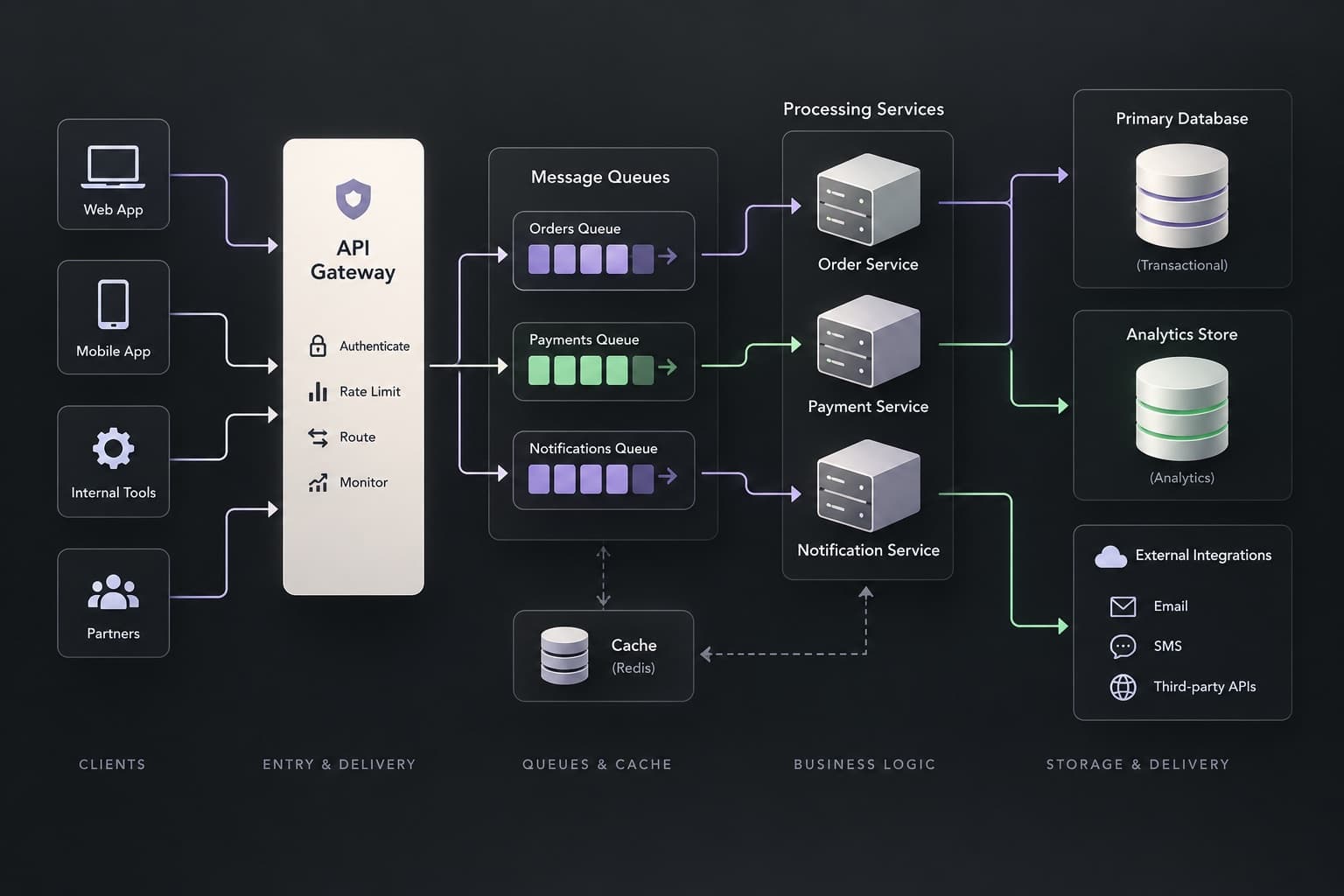
Replit puts launch settings in one Publishing tool: the domain, who can access the app, production database settings, monitoring, a security scan, deployment type, machine size, secrets, and region. Replit always scans before publishing, and a setting decides whether critical vulnerabilities block the publish. The region is locked once you publish, so changing it later means remixing the app.[1]
Which Replit deployment type should you use: Autoscale, Reserved VM, Static, or Scheduled?
Autoscale is the right deployment type for most Replit web apps and APIs. Replit's deployment types page says Autoscale adds servers when the app is busy and drops to as low as zero when idle, and is the default. Reserved VM runs one dedicated machine that never sleeps, for bots, background workers, and always-on APIs. Scheduled runs a command on a cron schedule with no public URL. Static serves files with no backend.[2]
Static Deployments are not compatible with apps built by Replit Agent, because Agent builds full-stack apps that need a backend server, according to Replit's documentation. Secrets are also unavailable to Static Deployments. Choose Static only for a marketing page or documentation site that you build separately. For an Agent-built app, the real choice is Autoscale versus Reserved VM, and the deciding question is whether the app must keep running between requests.[2][13]
Autoscale apps go idle after 15 minutes without requests and start again on the next request, according to Replit's publishing costs page. That cold start is fine for most business apps. It is a problem for a WebSocket chat, a Discord or Slack bot that must stay connected, or a job queue worker, which belong on Reserved VM. Scheduled deployments fit nightly reports, reminders, and backup triggers.[3]
How much does Replit hosting cost for a production app?
Replit publishing is billed from your plan's monthly credits first, then as usage. Replit's publishing costs page lists Autoscale at a 2 US dollar monthly base fee, 0.60 US dollars per million compute units, and 0.40 US dollars per million requests. One CPU second equals 18 compute units and one GB-second of memory equals 2 compute units. Replit's own example puts a small business site with 75,000 requests a month at about 2.39 US dollars.[3]
Plan prices set the floor. Replit's pricing page lists Core at 18 US dollars a month billed annually, with 20 US dollars shown as the undiscounted price, and Pro at 90 US dollars a month billed annually, with 100 US dollars undiscounted, as of November 2026. The free Starter plan includes one published app that goes down after 30 days and carries a Made with Replit badge. Core lifts the cap to unlimited published apps.[4][5][6]
Our view: In our assessment, hosting is rarely the largest cost of a Replit app; Agent usage during development and database storage usually matter more. Replit's database documentation says production databases bill compute and storage, with compute pausing after five minutes without queries. Set a spending limit before launch and recheck machine size after the first week of real traffic.[8]
| Deployment type | Price | Best for | Watch out for |
|---|---|---|---|
| Autoscale | 2 dollars a month base + 0.60 per million compute units + 0.40 per million requests | Web apps and APIs with variable traffic | Goes idle after 15 minutes; first request starts it again |
| Reserved VM, shared | 15 dollars a month for 0.5 vCPU and 2 GB RAM | Small always-on bots and workers | Fixed cost even with no traffic |
| Reserved VM, dedicated | 35, 50, or 130 dollars a month for 1, 2, or 4 vCPU (4, 8, or 16 GB RAM) | Steady traffic, memory-heavy background work | Size it from real CPU and memory charts |
| Scheduled | 2 dollars a month base + 0.60 per million compute units | Cron jobs, reports, reminders | No public URL; no uptime checks |
| Static | Free hosting + 0.05 dollars per GB transferred | Landing pages and docs | Not compatible with Agent-built full-stack apps |
When does Autoscale cost more than a Reserved VM on Replit?
Our view: Autoscale costs more than the 15 US dollar shared Reserved VM once usage charges pass 13 US dollars a month, the gap between the VM price and Autoscale's 2 dollar base fee. Using Replit's published rates, the monthly Autoscale bill is 2 dollars plus requests times compute units per request times 0.60 dollars per million, plus 0.40 dollars per million requests. The break-even depends on how much compute each request uses.[3]
Our view: Illustrative calculation using Replit's own examples: its small business example uses 600,000 compute units for 75,000 requests, or 8 units per request, so each million requests costs 8 times 0.60 plus 0.40, or 5.20 dollars. Thirteen dollars divided by 5.20 gives about 2.5 million requests a month. Replit's API example uses 13.2 units per request, which costs 8.32 dollars per million and breaks even near 1.56 million requests.[3]
A shared VM has 0.5 vCPU and 2 GB of memory and never sleeps, so it suits steady load and persistent connections, while Autoscale adds machines for spikes and shares compute across concurrent requests, which lowers the real per-request cost. Plan credits apply to both. Measure compute units on the Usage page after a week of real traffic before switching.[3][2]
| Compute units per request | Cost per million requests | Break-even requests per month | Source of the ratio |
|---|---|---|---|
| 8 | 8 x 0.60 + 0.40 = 5.20 | 13 / 5.20 = about 2.5 million | Replit small business example |
| 13.2 | 13.2 x 0.60 + 0.40 = 8.32 | 13 / 8.32 = about 1.56 million | Replit API service example |
| 30 (heavier requests, assumed) | 30 x 0.60 + 0.40 = 18.40 | 13 / 18.40 = about 0.71 million | Assumption for illustration |
How do Replit development and production databases work?
Every Replit app has two PostgreSQL databases: a development database that Agent builds against and a production database that serves the published app. Replit's documentation says the production database is created automatically at publish on current infrastructure, provided the development database contains data. Agent cannot modify the production database; it reads it only through a read-only replica. Each environment gets its own DATABASE_URL, and the published app runs with REPLIT_DEPLOYMENT=1.[8]
Publishing applies schema changes from development to production using drizzle-kit, covering tables, columns, indexes, constraints, views, and row-level security (RLS) policies, the Postgres rules that decide which rows a request may read or change. Replit says publish does not copy database functions, procedures, triggers, or grants, and has limited support for roles. An audit-log trigger or an updated_at stamp therefore has to be recreated in production deliberately.[8]
Replit flags risky changes during publish: removing columns or tables that hold data, changing column types, adding required fields without defaults, renaming, and adding unique constraints. It can create a publish preview, an isolated copy of production to test the migration first, and the app may see brief downtime while changes apply. Production databases have no connection pooling by default, so set a pool size in your framework.[8]
What is missing between a published Replit app and a production app?
Recovery is the gap to close first, because Replit splits it into separate code and data mechanisms that do not undo each other. Point-in-time recovery (PITR) keeps a continuous history of the production database so it can be restored to any second inside a window. Replit's data recovery page says PITR is on by default with a 7-day window, or up to 28 days on Pro, Teams, and Enterprise, while development data is restored through Agent checkpoints.[9][7]
Release tracking is the owner's job. Replit's after-you-publish page says publishing runs through provision, security checks, build, bundle, and promote, usually in a minute or two, and creates a Published your App commit. It also says you are responsible for identifying tested, healthy versions to use as rollback points, and deployment logs are kept for 30 days. Record each deployment ID and Git commit in a release log.[10]
Sign-in choice affects production too. Replit's auth guide compares Replit Auth, where users sign in with a Replit account on a Replit-branded page in a single environment, with Clerk Auth, which gives the app its own tenant, custom branding, and separate development and production environments. Replit describes Clerk as the better fit for customer-facing or commercial products. Switching later means migrating users, so decide before launch.[15]
| Area | What Replit provides | What you still prove | Official doc |
|---|---|---|---|
| Access control | Auth options and RLS policies carried by publish | Server code checks the signed-in user on every private route | docs.replit.com/learn/projects-and-artifacts/auth |
| Secrets | AES-256 encrypted Secrets, synced to the app on publish | Production uses live keys; development uses test keys | docs.replit.com/core-concepts/project-editor/app-setup/secrets |
| Environments | Separate development and production databases | No test accounts or sample data copied into production | docs.replit.com/features/data-and-storage/development-and-production |
| Migrations | drizzle-kit on publish, risky-change flags, publish preview | Triggers, functions, and grants recreated and tested in production | docs.replit.com/features/data-and-storage/development-and-production |
| Backups | PITR on by default; scheduled backups from Core | A timed restore drill and a matching code checkpoint | docs.replit.com/features/data-and-storage/data-recovery |
| Monitoring | Uptime checks on paid plans, alerts, 30 days of logs | A named person receives alerts and reviews errors | docs.replit.com/features/publishing/monitoring-a-deployment |
| Releases | Deploy logs with Build ID, Deployment ID, and Git commit | A release log listing healthy rollback points | docs.replit.com/features/publishing/after-you-publish |
How do you connect a custom domain and monitor a Replit app?
A custom domain on Replit uses an A record and a TXT record copied from the Publishing tool into your registrar, and DNS changes can take up to 48 hours. Replit's custom domains guide says the replit-verify TXT record must stay in place because Replit renews the SSL certificate through DNS validation. Cloudflare-proxied records block renewal, so set them to DNS only, the grey cloud.[12]
Replit's Monitoring tool shows uptime, requests, HTTP status codes, request durations, CPU, memory, and logs for the published app. Monitoring alerts watch application error logs, HTTP errors, and request latency. Uptime checks need a paid plan and are not available for Scheduled deployments, and deployment logs are retained for 30 days. For anything you must keep longer, such as audit records, write them to your own database or log service.[11]
Should you stay on Replit, export to GitHub and your own infrastructure, or rebuild?
Our view: Stay on Replit when the team keeps using Agent, the app fits Autoscale or a Reserved VM, and the region and monitoring meet your requirements. Move when you need infrastructure Replit does not offer, a cloud account your customer mandates, or a deployment pipeline with code review and automated tests. Replit's Git pane connects a project to GitHub with commit, push, branch, and merge support, which is the starting point for any move.[14]
Our view: Moving off Replit is mostly an inventory of platform services. The code is ordinary application code, but check for anything tied to Replit: the managed PostgreSQL connection in DATABASE_URL, Replit Auth, which signs users in with Replit accounts, object storage, connectors, Replit AI Integrations, Secrets, and Scheduled deployments. Each needs a replacement and a data or user migration. Our software project handover checklist lists what a receiving team needs.[15][6]
How we review a Replit app before launch
Our Replit review starts by comparing the two database schemas, because publish carries tables and policies but not triggers, functions, or grants. From the Shell we run pg_dump with the schema-only option against the development DATABASE_URL, then against the production connection string from the Database tool's Production settings, and diff the two files for CREATE TRIGGER, CREATE FUNCTION, and GRANT lines. Replit warns not to paste these connection strings into chats or tickets, so the files stay in the workspace.[8]
Next we confirm which database the live app really uses. We check that the code reads DATABASE_URL, that Secrets holds no second database connection, and that a record created on the published app appears under Production in the Database tool, which opens read-only. Then we open Publishing, Adjust settings, and the production app secrets, and check each value is a live key rather than a test key, without copying values anywhere.[8]
For releases, we open the deploy logs for the current deployment and write the Build ID, Deployment ID, and Git commit into a release log, since Replit keeps deployment logs for 30 days. We turn on Block publishing of critical vulnerabilities, set the point-in-time recovery window, and rehearse a restore on a remixed copy of the app rather than on live data, because a restore replaces production data and cannot go forward again.[10][9]
- What we flag first: a CREATE TRIGGER, CREATE FUNCTION, or GRANT line present in the development schema dump and missing from production.
- A DATABASE_URL or other database connection added by hand in Secrets, which can point the live app somewhere other than the Replit production database.
- Development and production connection strings with the same endpoint ID, which Replit says can indicate a legacy shared database.
- Test keys in production app secrets, or test accounts copied into production tables.
- No recorded Git commit for the live deployment, with deploy logs close to their 30-day limit.
- Replit Auth on a customer-facing app, where users must hold Replit accounts to sign in.
Our view: what we would not do with a Replit app
Our view: We would not move an Agent-built app to a Reserved VM to save money below roughly 1.5 million requests a month, because the break-even calculation above shows Autoscale is usually cheaper at that volume; move for always-on behaviour instead. We would also not launch a customer-facing brand on Replit Auth, since its users sign in with Replit accounts on a Replit-branded page, and Replit itself points branded commercial products to Clerk Auth.[3][15]
Hosting choices are widening for larger buyers. Replit's changelog for November 20, 2026 says Enterprise teams can request early access to publishing apps into their own Microsoft Azure tenant, with development staying on Replit. Check the current documentation before launch, because prices and limits in this guide reflect what Replit published in November 2026.[16]
What drives the cost and time of making a Replit app production-ready?
Our view: On Replit, the engineering work clusters around the database boundary and sign-in rather than hosting. In our assessment, the effort rises with each trigger, function, or grant that publish leaves behind, with any move from Replit Auth to a branded provider, which forces a user migration, with connectors and keys that need separate test and live values, and with background work that has to move from Autoscale to a Reserved VM or Scheduled deployment.
Diffwise.app quotes each project after a scoping conversation, and the software project estimator on this site gives a first range from a feature list. The sister guides on Lovable and Bolt show how those platforms handle databases and recovery differently.
Frequently asked questions
Is Replit good enough to host a production app?
Replit can host production web apps: Autoscale scales from zero with traffic, Reserved VMs give dedicated machines from 15 US dollars a month, and production databases have point-in-time recovery switched on by default. Whether your app is production ready depends on access control, secrets, payment handling, release records, and tested restores, which remain the owner's responsibility.
What is the difference between Autoscale and Reserved VM on Replit?
Autoscale adds servers under load, scales to zero when idle, goes idle after 15 minutes without requests, and bills a 2 US dollar base fee plus compute and requests. Reserved VM is one dedicated machine that never sleeps, billed at a fixed monthly price from 15 US dollars. Use Autoscale for ordinary web apps and Reserved VM for bots, workers, and always-on connections.
Does Replit Agent change my production database?
No. Replit's documentation says Agent cannot modify the production database and reads it only through a read-only replica. Agent edits the development database, and schema changes made there are applied to production when you publish, after Replit flags risky changes. You can edit production data yourself in the Database tool by turning on Enable Editing.
Why does my Replit app go down after 30 days?
On the free Starter plan, the one included published app automatically goes down after 30 days, though you can publish it again. Core removes that limit and allows unlimited published apps. Replit's pricing page lists Core at 18 US dollars a month billed annually, with 20 US dollars shown as the undiscounted price, as of November 2026.
How do I back up a Replit production database?
Point-in-time recovery is on by default for production databases with a 7-day window, and Pro, Teams, and Enterprise can choose 28 days. Scheduled daily backups are off by default and can be turned on from Core under Settings, then Advanced. Restoring production does not roll back code, so restore the database, roll back to the matching checkpoint, and publish again.
Do Replit secrets carry over to the published app?
Yes. Replit's publishing overview says secrets sync automatically from the development environment to the published app when you publish or republish. Secrets are encrypted with AES-256 at rest and are available to every deployment type except Static. Use separate test and live keys, and check the production values under the deployment's secrets before launch.
Sources and further reading
- PublishingReplit · Checked 23 November 2026
- Deployment typesReplit · Checked 23 November 2026
- Publishing costsReplit · Checked 23 November 2026
- Replit pricingReplit · Checked 23 November 2026
- Starter PlanReplit · Checked 23 November 2026
- Replit CoreReplit · Checked 23 November 2026
- Replit ProReplit · Checked 23 November 2026
- Development and production databasesReplit · Checked 23 November 2026
- Data recoveryReplit · Checked 23 November 2026
- After you publishReplit · Checked 23 November 2026
- Monitoring your appReplit · Checked 23 November 2026
- Custom domainsReplit · Checked 23 November 2026
- SecretsReplit · Checked 23 November 2026
- Using the Git paneReplit · Checked 23 November 2026
- AuthReplit · Checked 23 November 2026
- Changelog: November 20, 2026Replit · Checked 23 November 2026